

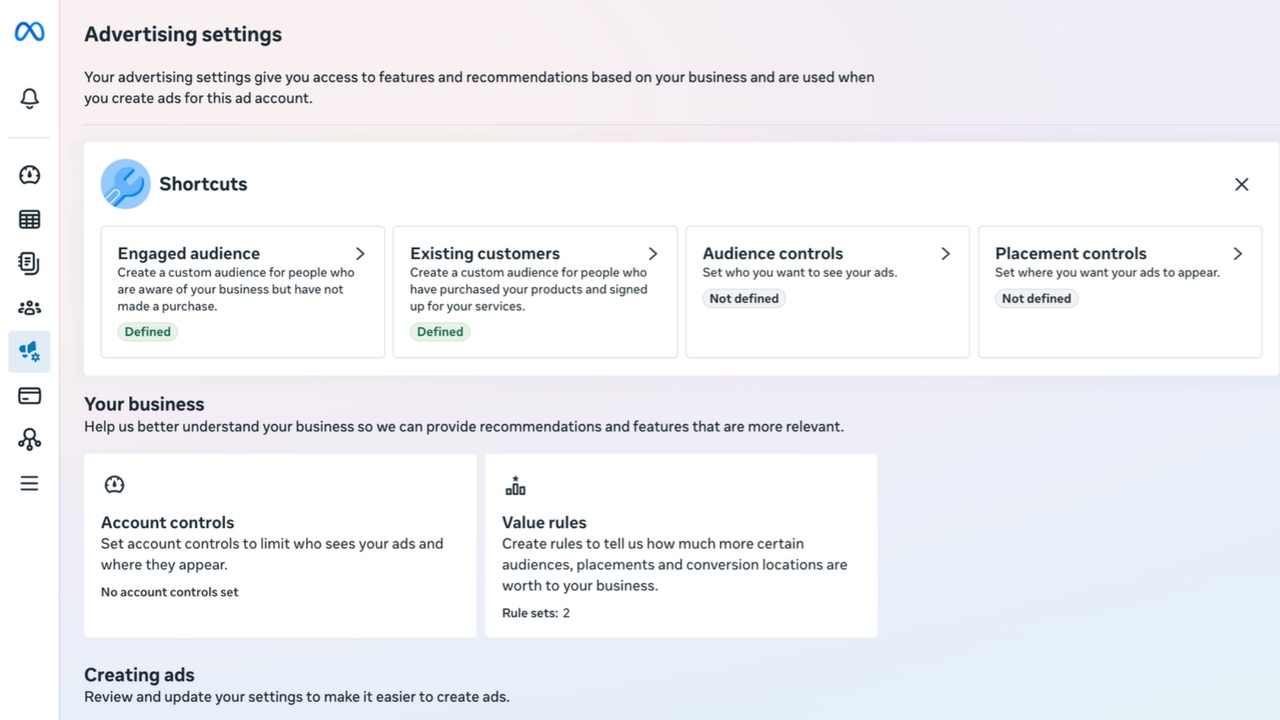
Meta runs two audience systems that share almost the same vocabulary. One lives on the audience. The other lives on the account. Setting one does not set the other, and they feed completely different machinery.
The confusion here is structural rather than careless. Both systems use the words engaged and customer, both sit in Ads Manager, and neither one reads the other. A label changes what Meta bids. A segment changes what you can see.
Track 1 · set on each audience
Custom audience
Leads (090)
Audience label
qualified_leads
Value rules
for audiences
The auction
delivery changes
Track 2 · set once on the ad account
Advertising settings
Audience segments
Engaged / Existing customers
Segment breakdown
Reporting
nothing changes
New audience
Everyone you did not put in the other two. Meta fills this in for you, you never define it.
Labels change what Meta bids. Segments change what you can see.
The same four questions, asked of each system:
| Audience labels | Audience segments | |
|---|---|---|
| Where | Audiences → create or edit an audience | All tools → Advertising settings → Audience segments |
| Scope | One label per custom audience, set on every audience individually | Set once per ad account. You nominate which audiences count as Engaged and which count as Existing customers |
| Feeds | Value rules for audiences, which raise or lower your bid for people in that audience | The audience segments breakdown in Ads Manager reporting |
| Also does | Groups the audiences list in the interface, so a long list is not one flat pile of names | Capped Advantage+ Shopping spend on existing customers, until Meta removed that cap |
| Effect on delivery | Indirect, and only once a value rule points at the label | Contested |
Table of contents
The mistake this prevents
Labeling an audience High value does not put it in the Existing customers segment. Nominating that same audience as an Existing customer does not give it a label. They are two jobs in two places, and doing one feels like doing both.
Audience labels, in detail
One label per audience, from a fixed picker. The picker's two headings echo the segment names without being the segments, which is where this starts to go wrong.
| Label in the interface | API value | What it is for |
|---|---|---|
| Group: Engaged audiences | ||
| Qualified leads | qualified_leads | Leads that meet your qualification criteria |
| Disqualified leads | disqualified_leads | Leads that do not. Useful to bid down |
| App users | app_installers | Current app users |
| Trial users | trial_users | Started a trial |
| Other engaged users | engaged_users | Interested, has not bought yet. The catch-all |
| Group: Customers | ||
| High value | high_value_customers | Your best buyers, however you define best |
| Low value | low_value_customers | One-time discount buyers, refund-prone |
| At risk | at_risk | Customers trending toward churn |
| Disengaged | disengaged | Lapsed |
| General customers | customer_leads | Everyone else who bought |
The label set is not fixed across accounts
Published guides list values that plenty of accounts do not show, including Cart abandoners and Recent purchasers. Meta rolls these out unevenly. Trust the picker in the account in front of you over any write-up, including this one.
Labels are also write-only through the Meta Ads API. You can set one, and no read call returns it. The only way to audit your tags is the audiences list, where they nest under their label group.
Audience segments, in detail
Segments sort every person your ads reach into exactly three buckets. You define two of them by naming audiences. The third is arithmetic.
- Existing customers. Purchasers or leads. Customer list uploads, and purchase-event or lead-event website audiences.
- Engaged audience. Aware of you, has not converted. Website visitors, and newsletter or subscriber lists.
- New audience. Everyone else. Meta computes this one, and you never define it.
Delivery is the contested row. Segments were once used to cap Advantage+ Shopping spend on existing customers, Meta removed that cap, and there is no clear documentation of a direct delivery effect now.
Social engagers cannot go in the Engaged audience
Engagement custom audiences, meaning Page engagers, Instagram engagers and video viewers, are ineligible for the Engaged audience segment despite the name. Meta counts those people as New audience.
So any account with strong organic engagement overstates its New audience, and a genuine engagement audience cannot be used here at all.
What the breakdown gives you
Ads Manager, then Breakdown, then Audience segments. Every metric splits three ways, and two of those readings are worth the setup on their own.
- Amount spent by segment. How much budget went to people who already knew the brand. This settles most retargeting arguments.
- Cost per result by segment. True new-customer cost, separated from the conversions retargeting was always going to pick up.
A campaign with a mediocre blended ROAS and a strong new-customer ROAS is usually the healthier one to scale. You cannot see that split without segments defined.
Value rules are what make a label do anything
Value rules tell Meta to bid more or less for people matching some criterion, instead of excluding them outright. That distinction carries the whole idea: a hard targeting restriction turns Advantage+ off, and a bid adjustment leaves it on.
There are two kinds, and only the second one touches labels.
- Value rules for demographics and placement. Age, gender, device, mobile operating system, location, placement, conversion location. No labels involved.
- Value rules for audiences. These point at your labeled custom audiences. This is the one that makes labels functional rather than cosmetic.
What the audience picker offers
Choosing Audience, then Audience labels, opens a picker with four groups. Three are your labeled audiences. The fourth is not a label at all.
| Group | Meta's own wording | What it selects |
|---|---|---|
| New audiences | People who are not included in your custom audiences | The residual. Ticked directly, no label needed |
| Engaged audiences | Prospective customers who have engaged with your business but have not converted yet | Your audiences tagged in the Engaged group |
| Customers | Audiences who have made a purchase from your business | Your audiences tagged in the Customers group |
| Other audiences | Audiences that do not fit into the other label groups | Everything else, including untagged audiences |
New audiences needs no tagging, so it is the one value rule available on a brand new account. Bid it up to push budget toward acquisition. Bid down on Customers and you have rebuilt the old Advantage+ Shopping existing-customer budget cap by hand.
Adjustments run from roughly minus 90 to plus 1000 percent. Start at plus or minus 20 to 30 so the result stays readable. Two criteria per rule, maximum.
Three ways these go wrong
- Rules compound. Plus 50 percent on customers and plus 30 on high value is plus 80 for anyone in both. That is rarely what was intended.
- Thin segments produce noise. A large adjustment on under roughly 100 conversions a month tells you nothing.
- They corrupt creative tests. Bid adjustments change delivery, so a test running through a rule change is unreadable.
Three different things are called new
The word new shows up in three places and means something different in each one.
- Value rules. New audiences means anyone not in any of your custom audiences.
- Segments breakdown. New audience means anyone not in the Engaged or Existing customers segments you nominated.
- Customer lifecycle strategy. New customers means anyone not in the audiences you manually excluded on that ad set.
Three populations, three sizes, one word. Someone sitting in a 365-day engagement audience is inside a custom audience, so value rules do not treat them as new. Segments cannot accept social engagers, so the breakdown counts that same person as New audience. One person, opposite answers.
Customer lifecycle strategy reads neither one
There is a third setting, this one at ad set level in Sales campaigns. Two options: get conversions from all audiences, or acquire new customers. It looks like the automation that finally wires segments into delivery.
Jon Loomer tested it in live accounts in June 2026, correcting his own April write-up, which had assumed it would read segment definitions. Acquire new customers reads neither your segments nor your labels. You still pick the audiences to exclude by hand. His verdict was that there is no magic in it, and that it gives you a second place in the interface to do an exclusion you could already do.
Meta's own copy agrees. The default option tells you to include or exclude custom audiences in your audience settings or your advertising settings. It never mentions segments.
What to do with this
Set segments once at the account level, and go in knowing your engagement audiences will land in New audience. You are doing it for the reporting split, which is worth having on its own.
Label your audiences separately, and build a value rule only when you intend to change what Meta bids. A label with no rule pointing at it is a filing system. That is a fine thing to have, as long as you know that is what you have.
Then go and check the picker in your own account, rather than trusting any guide, this one included.
Sources
- Jon Loomer, value rules for audiences and labels
- Jon Loomer, value rules keep Advantage+ on
- Jon Loomer, audience segments
- Jon Loomer, customer lifecycle strategy is not what advertisers thought, 4 June 2026, the hands-on test that supersedes the April piece
- Jon Loomer, customer lifecycle strategy, 2 April 2026, written before access and assuming segments were used
- Foxwell Digital, everything you need to know about audience segments
- Foxwell Digital, customer lifecycle strategy coming to Meta ads in 2026
- Flighted, audience segments explained
- Alex Neiman, value rules for audiences, a 2026 practitioner guide
- Meta Help Center, audience segments