

If you run a business on Facebook or Instagram, you’ve gotten the email. The one with the Meta logo, the urgent language, the “your account will be paused in 7 days” warning, and a button begging you to click. Some of them are real. Most of them aren’t. And the ones that aren’t are getting harder to tell apart from the ones that are — including a brand-new wave of fake partner requests that are slipping past spam filters because they’re being sent through Meta’s own systems.
We’ve watched clients receive convincing fakes that lead to drained ad budgets, hijacked Pages, and weeks of recovery work. So here’s the approach we use ourselves and recommend to every business we work with.
⚠️ Active threat: the fake “partner request” scam
Before we get into the broader advice, there’s a specific scam circulating right now that deserves its own warning. Several of our clients have already flagged it, and it’s a textbook example of why the rules in this post matter.
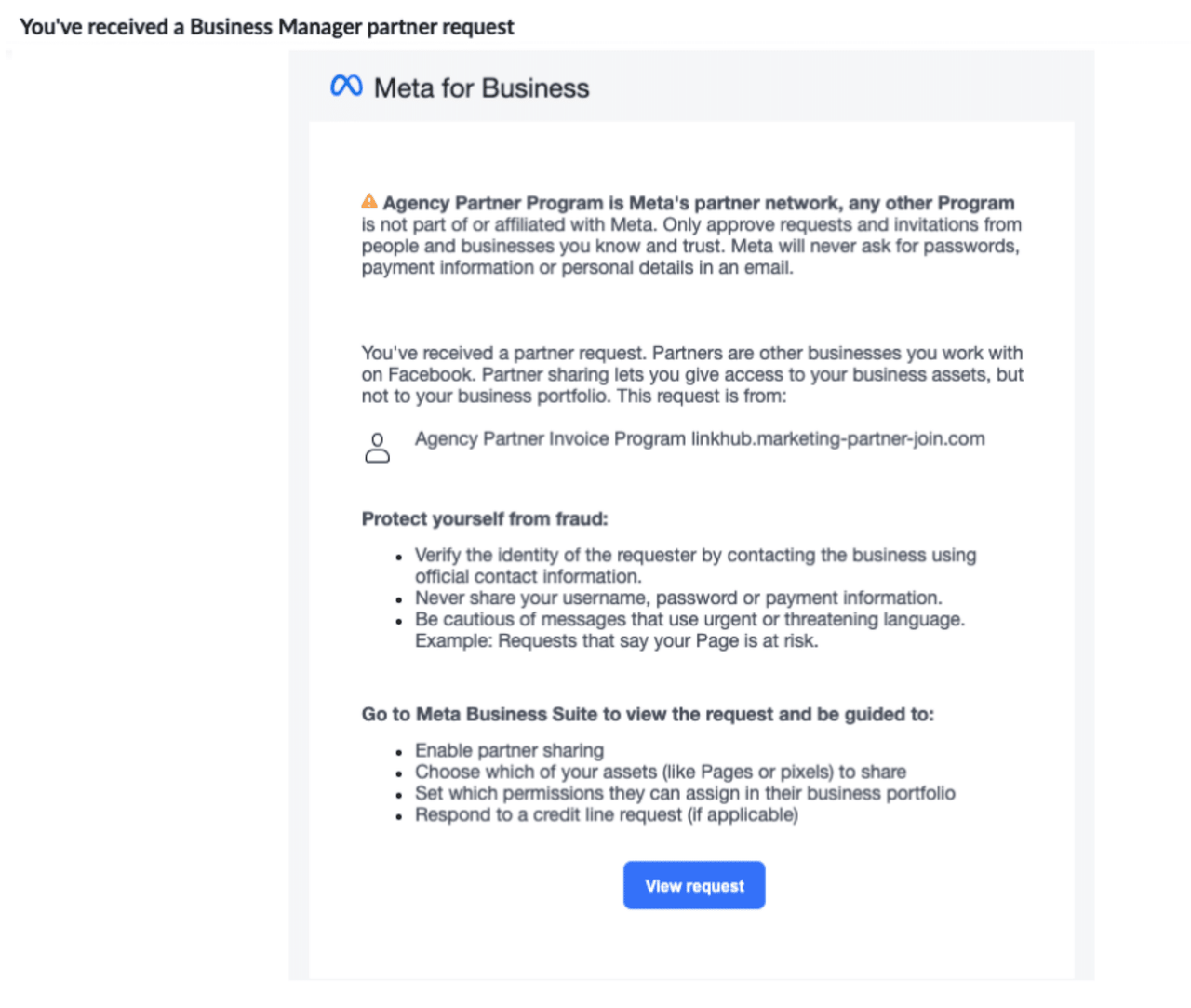
Starting in mid-April 2026, scammers began sending fake Business Manager partner requests through Meta’s own system. The attack is unusually convincing because the emails come from real Meta infrastructure — they pass spam filters, arrive from legitimate Meta sender addresses, and use Meta’s exact branding and email layout. Documented examples are coming from a fake “Agency Partner Invoice Program” linked to the domain linkhub.marketing-partner-join.com (registered April 16, 2026, just before the campaign began). Other variants use names like “Meta Professional Partner Program” or “Meta Agency Credit Program.”
If you click “View request” and approve, the attackers gain access to your business assets — ad accounts, Pages, pixels, and payment methods. They can drain your ad budget running their own campaigns on your card, exfiltrate your customer data, hijack your Pages, or sell the access on. For agencies managing multiple clients, a single approved request can expose every client account in the portfolio.
What to do right now:
- Do not approve any unexpected partner request, even if the email looks completely official. Legitimate partners coordinate with you outside of Meta first — a request that arrives unannounced is suspicious by default.
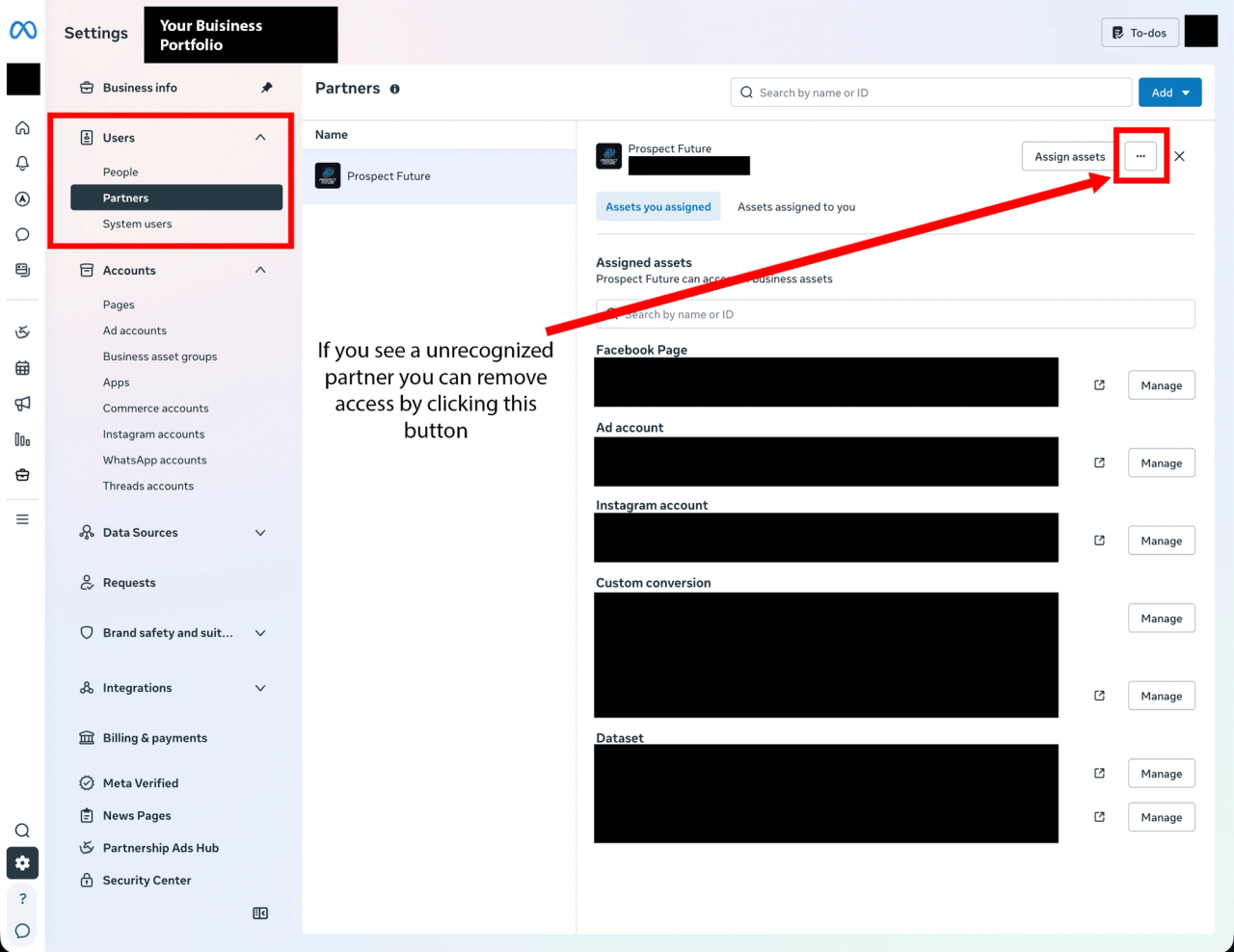
- If you get a partner request notification, do not click links in the email. Log into Business Manager directly and go to Settings → Users → Partners to review.
- If you see an unrecognized partner already listed, remove their access immediately. You can always re-add a legitimate partner later — the cost of removing a real one is minor; the cost of leaving a malicious one in place is catastrophic.
- Turn on “Require 2FA for anyone to access this business portfolio” inside Business Manager Settings → Security Center. This single setting blocks most account takeover paths.
- Audit your existing user list. Go to Settings → Users → People and remove anyone who no longer needs access — old contractors, former employees, agencies you no longer work with.
- When in doubt, send it to us. If you’re a Prospect Future client and something looks off, forward it our way before doing anything. We’d rather take five minutes to verify than spend weeks helping you recover an account.
This particular scam will eventually get patched on Meta’s end. The next one won’t look exactly the same. But the underlying pattern, using urgency, real-looking branding, and trusted-seeming infrastructure to get you to click something you shouldn’t, is the same pattern behind every Meta scam we’ve ever seen. So the rest of this post is the broader playbook: how to recognize a fake Meta communication in any form, where to verify what’s actually happening with your account, and the habits that protect you regardless of which scam is making the rounds this month.
The one rule that solves 90% of the problem
Never click links inside an email or message claiming to be from Meta. Ever. Even if it looks completely legitimate.
Instead, open a new browser tab, log directly into your Facebook account, and go check the relevant section yourself. If Meta is genuinely trying to tell you something — a payment issue, a policy flag, a partner request — it will be visible inside your account. If it’s not there, the email isn’t real.
This single habit defeats nearly every phishing attempt currently in circulation. It costs you about thirty seconds. It can save you your business.
Where to actually check inside your account
When you get a suspicious email, message, or phone call, here are the four places to verify what’s really going on:
1. Meta Business Support Home — business.facebook.com/business-support-home This is your central dashboard for the status of your business portfolios, ad accounts, commerce accounts, and Pages. If something is wrong, it shows up here.
2. Business Settings Security Center — business.facebook.com/latest/settings/security_center Two-factor authentication, admin reviews, and security recommendations live here. If an email is telling you to “secure your account,” this is where you’d actually do that — not by clicking a link.
3. Page Status & Profile Quality — facebook.com/settings/?tab=profile_quality Any policy violations, content warnings, or restrictions on your personal profile or Pages are documented here. If an email claims you’ve violated something, this page will confirm it or expose the email as a fake.
4. “I’ve been contacted by a Meta representative — is it real?” — facebook.com/business/help/372703956148310 Meta’s own guidance on how to verify whether a phone call or email actually came from them. Bookmark this one.
Red flags in the email itself
If you do find yourself reading a suspicious email, here’s what to inspect before doing anything else.
Check the sender domain. Legitimate Meta correspondence comes from domains like @facebookmail.com, @meta.com, @fb.com, @facebook.com, @support.facebook.com, or @business.fb.com. Scammers often send from AppSheet addresses, random Gmail accounts, Salesforce noreply addresses, or domains that look like Meta but aren’t (metasystemchat.com, meta-support.co, etc.).
A word of caution, though: the domain check alone is no longer enough. Phishing campaigns have been documented sending mail from the legitimate facebookmail.com domain by abusing Facebook’s own Business invitation feature. The email is real — but the page name embedded in it links somewhere malicious. Domain check is necessary but not sufficient. Always combine it with the “log in directly and verify” rule above.
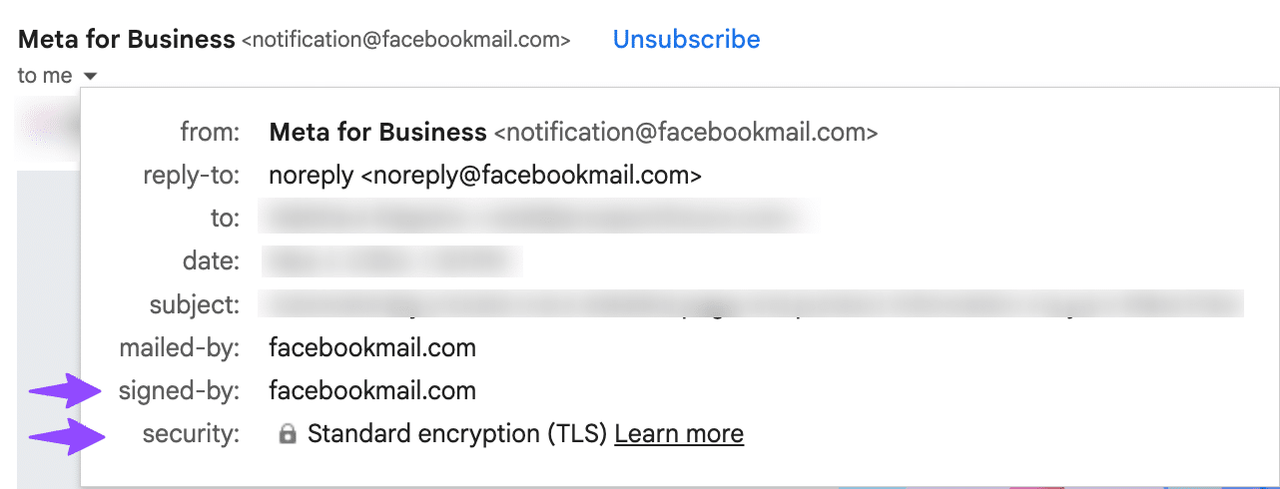
Check the email’s security signature. In Gmail, click the little arrow next to the sender name to expand the full header. Look at the signed-by field. A legitimate Meta email will be signed by a Meta-controlled domain. If it’s signed by something like someuser-co.20251104.gappssmtp.com, that’s a generic Google Workspace forwarding signature — meaning someone at that domain forwarded it through their own Gmail account. Useful for confirming a forwarded message, but a clear tell that the underlying email is not a direct send from Meta.
Watch for urgency and pressure. “Your ads will be paused in 7 days.” “Your account will be deleted in 24 hours.” “Action required immediately.” Real Meta communications are usually neutral and informational. Manufactured urgency is the single most reliable scam indicator across every phishing campaign we’ve seen.
Watch for generic salutations. “Dear User” or “Account Holder” instead of your name or business name. Meta knows who you are.
Hover, don’t click. On desktop, hover your mouse over any link to see where it actually goes. The displayed text might say business.facebook.com, but the underlying URL might be vercel.app/login-meta-verify or some other host. If the destination doesn’t match an official Meta domain, don’t click it.
Messenger chats from “Meta Business Support”
Meta does sometimes reach out via Messenger from a verified Meta Business Support account. Real ones have a few consistent markers:
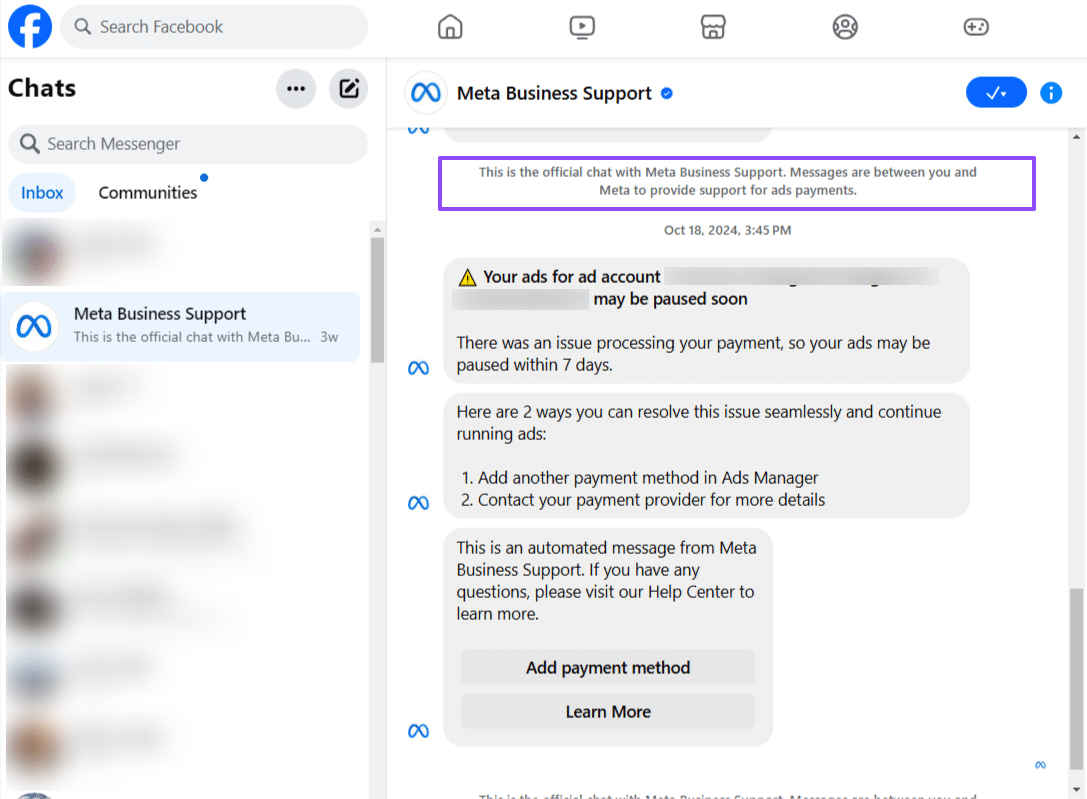
- A blue verification checkmark next to the name
- A purple banner header stating: “This is the official chat with Meta Business Support. Messages are between you and Meta to provide support for ads payments.”
- The Meta logo (the infinity symbol) as the profile image
- Messages that route you back to Ads Manager or your Business Settings — never to an external link
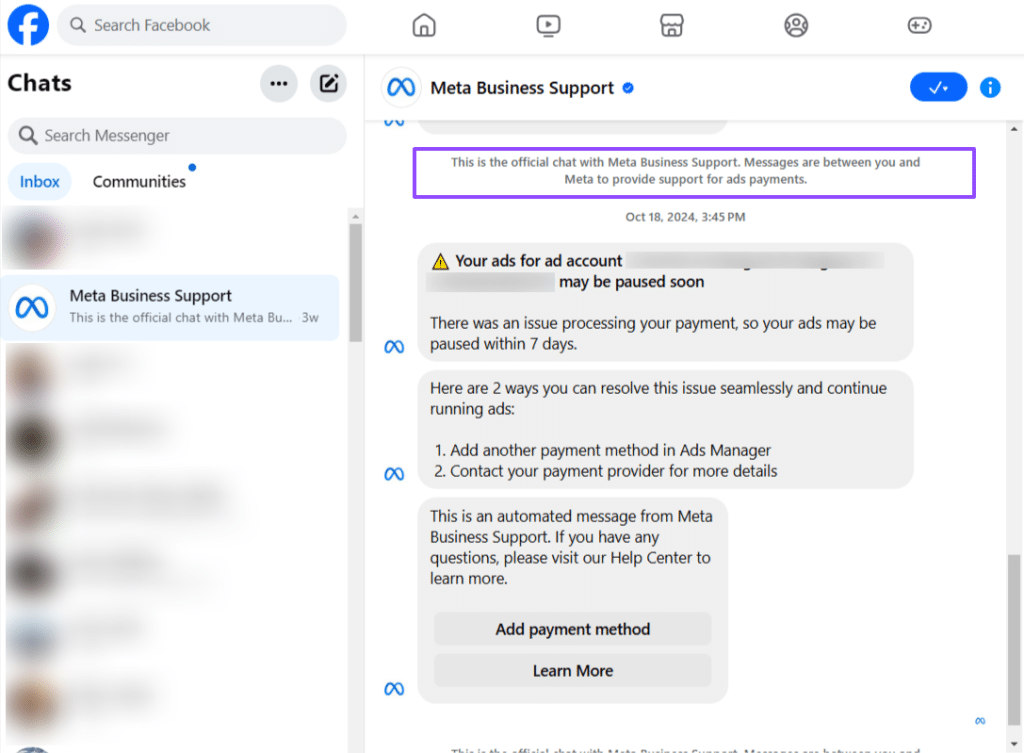
If you’re getting a Messenger message claiming to be from Facebook Support but it’s coming from a regular user account — even one with “Meta” or “Facebook” in the name — it’s a scam. Meta does not have employees DM you from personal-looking profiles.
A bonus verification trick
Inside your Facebook account settings, there’s a feature called “See recent emails from Facebook.” It lives under Password and Security. This page lists every email Meta has actually sent you in recent weeks. If the email sitting in your inbox isn’t on that list, it didn’t come from Meta — full stop. This is one of the most reliable verification tools available, and most people have never heard of it.
What to do if something looks wrong
- Don’t click anything in the email.
- Open a new tab, log into Facebook directly, and check the four places listed above.
- Forward the suspicious email to phish@facebook.com, then delete it.
- If you’re worried your account may already be compromised: change your password, enable two-factor authentication, and sign out of all devices from inside your security settings.
Why this matters more for businesses than individuals
A compromised personal Facebook is bad. A compromised Business Manager is catastrophic. Once a scammer is inside, they can launch ads on your credit card with five-figure daily budgets, remove you as an admin from your own Pages, delete your pixel and product catalog, and lock you out of years of accumulated assets and audience data. Recovery is possible but slow and painful — sometimes impossible.
The defense is unglamorous: a healthy skepticism, a habit of verifying through official channels, and the discipline to never click a link in an email that’s trying to make you panic. That’s it. That’s the whole playbook.
If you’d like help auditing your business’s Meta security setup, locking down admin access, or training your team to recognize these scams before they cost you anything, that’s part of what we do at Prospect Future. Reach out anytime.